
Hubspace
AferoHouse & Home
4.75.02K Reviews
- Version
- 2.7.0
- Installs
- 1.00M
- Age Rating
- Everyone
Screenshots
Our Review of Hubspace
 Analysis by Appyee
Hey there! Have you ever found yourself tangled in a mess of smart home apps, each controlling a different device? Let me introduce you to Hubspace, a game-changer in the world of smart home management. I’ve been playing around with it for a while, and I’ve got some thoughts to share.
Where Hubspace fits into a daily routine
I find Hubspace most useful when it becomes the place I check first, rather than another app I open only when a device misbehaves. Its role is straightforward: bring compatible home controls into one app, then make common actions easier to repeat. That can mean checking a light before bed, switching a plug off after using an appliance, or adjusting a group instead of tapping through several separate controls.
A realistic routine might start with a lamp scheduled to come on around the time I usually arrive home. If plans change, I can use the app to make a manual adjustment rather than relying on the schedule blindly. Later, a group can help switch several room devices together. The benefit is not that the home suddenly runs itself; it is that familiar tasks take fewer separate steps once the devices and controls are arranged in a way that suits the household.
That distinction matters. I would not treat a schedule as a substitute for checking what a device actually does, especially when other people share the space or routines vary from day to day. For a light, a predictable on-and-off plan can be convenient. For a plug attached to something that should not operate unattended, I would be more cautious and use the schedule only after thinking through the device and its safe use.
Getting Started with Hubspace
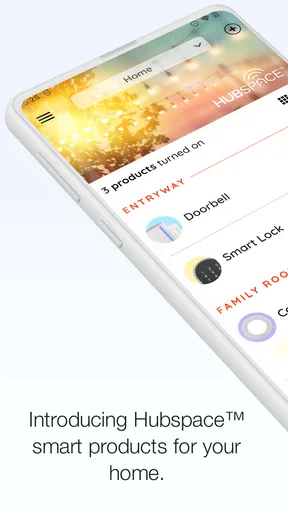
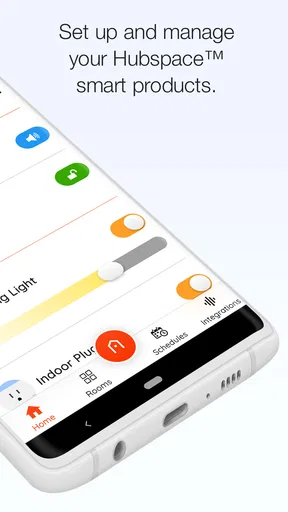
Setting up Hubspace was surprisingly smooth. You just download the app, connect it to your devices, and voilà! The app supports a variety of devices, from smart bulbs to plugs, making it a one-stop-shop for all your smart home needs. I found it quite intuitive; the interface is neat and easy to navigate. Even if you’re not a tech wizard, you’ll feel right at home.
Features That Stand Out
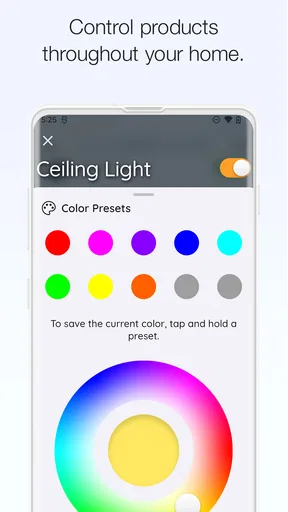
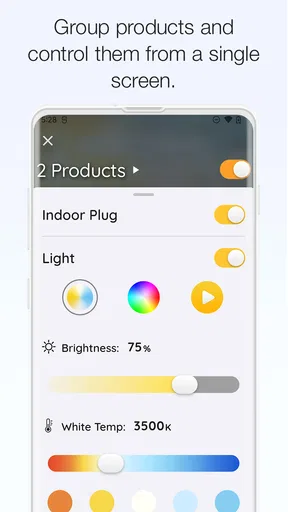
One of the coolest features I noticed is the group control. You can create groups for your devices, allowing you to control multiple gadgets with a single tap. It’s perfect for setting the mood in different rooms. Whether you want to dim the lights or turn on the fan, Hubspace has got you covered.
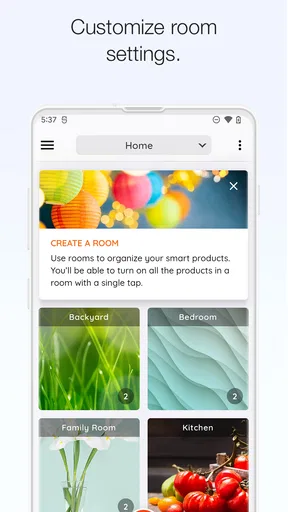
Groups are especially helpful when they match how people actually move through a home. I would group by room or by a shared moment, such as the lights I normally switch on while preparing dinner. A group that combines devices for unrelated tasks may save one tap but create more work if I regularly want only part of it. Starting with a small, obvious group and using it for a few days is a better test than trying to organize every device at once.
Another practical point is naming. Clear names make controls easier to find and reduce confusion when using voice commands. I would choose names that distinguish a device by room and purpose, rather than labels that sound alike. That small bit of housekeeping pays off most in a busy home, where someone may need to control a light without remembering how the app’s device list was originally arranged.
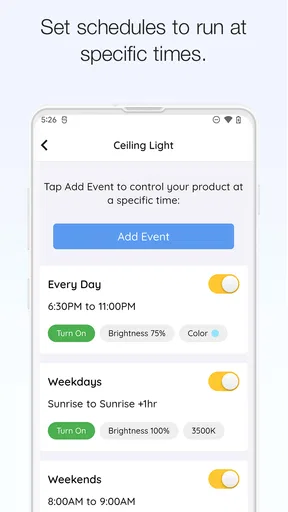
Another highlight is the scheduling feature. You can set your devices to turn on or off at specific times. Imagine waking up to your favorite tune or coming home to a well-lit house. It’s these little things that make life a tad bit easier.
Making settings and schedules work for you
The most useful way to approach scheduling is to begin with one routine that happens often, then see whether the timing remains useful through ordinary disruptions. A fixed time can suit a regular evening habit, but it may be less convenient when household members keep different hours. In that case, the schedule should simplify a task without becoming something everyone has to remember to work around.
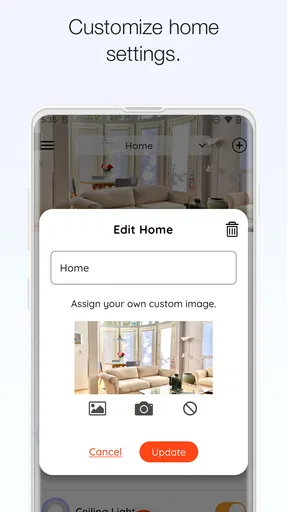
I would also review device names, room groupings, and existing schedules after making changes around the home. Moving a lamp or adding a plug can leave an old setup less intuitive, even if the controls still function. A quick check of the app’s organization helps keep the common actions obvious and avoids the slow accumulation of confusing labels and routines.
Schedules work best as a small set of dependable habits, not as a long list of hypothetical automations. I would avoid creating overlapping routines until I understand what each one controls and when it runs. If an action happens at an unexpected time, simplifying the schedule makes it easier to identify the cause than adding another rule in an attempt to compensate.
Integration and Compatibility
Hubspace plays well with others. It integrates seamlessly with voice assistants like Alexa and Google Assistant. I found it super convenient to just say “Hey Google, turn off the lights,” and watch the magic happen. If you’re like me and enjoy the hands-free experience, this feature will definitely appeal to you.
For a household that already uses a voice assistant, voice control can make a frequent action easier when hands are occupied. I still see the app as the place to organize and check controls, while voice is a shortcut for simple commands. If a spoken request is ambiguous, using a clear device name or a room-based group is a practical way to make the instruction more precise.
Choosing it over a patchwork of controls
Compared with relying on a separate app for each compatible light or plug, Hubspace has the appeal of a shared control point. That is most valuable when several devices need to be managed in ordinary, repeatable ways. A collection of manufacturer apps may still be preferable for someone whose devices span many ecosystems or who depends on specialized controls in each brand’s own software. I would choose convenience over consolidation only when the devices I actually use fit the app’s supported range.
It also helps to be realistic about what “one place” means. An app can make supported devices easier to reach without making every smart product in a home compatible. Before building a setup around it, I would check that each planned device works with Hubspace rather than assuming that smart bulbs and plugs from any maker will appear together. That check is more useful than buying first and hoping an app will bridge the gap later.
Features That Stand Out
One of the coolest features I noticed is the group control. You can create groups for your devices, allowing you to control multiple gadgets with a single tap. It’s perfect for setting the mood in different rooms. Whether you want to dim the lights or turn on the fan, Hubspace has got you covered.
Another highlight is the scheduling feature. You can set your devices to turn on or off at specific times. Imagine waking up to your favorite tune or coming home to a well-lit house. It’s these little things that make life a tad bit easier.
Performance and Personal Experience
In terms of performance, Hubspace didn’t disappoint. The response time is snappy, and I didn’t experience any lag or disconnection issues. It’s reliable, which is crucial for any smart home app. I’ve tried a few other apps, but this one seems to hit the right spot in terms of reliability and ease of use.
In day-to-day use, I would judge reliability not only by whether a tap works once, but by whether the controls remain understandable after the setup grows. A household with only a couple of devices may find almost any basic control app manageable. The more helpful test is whether I can still locate the right device quickly, recognize what a schedule will affect, and make a simple change without having to untangle a complicated arrangement.
If a device does not respond as expected, I would first check the straightforward things: whether I selected the right device or group, whether a schedule is involved, and whether the device itself is available to control. I would not assume that every delay points to a fault in the app. Keeping the setup simple makes it easier to tell whether the issue is a naming mistake, an unsuitable routine, or a device that needs attention.
Who will appreciate it—and who may not
I would recommend Hubspace to someone who wants a practical way to manage compatible lights and plugs without learning a complicated home-automation system. It suits people who value a few repeatable controls, such as room groups, basic schedules, and voice commands through an assistant they already use. The app is free, and its Everyone age rating makes it suitable for a broad audience, though a household should still decide who is allowed to change shared device settings.
It may be a less natural fit for a person whose home is built around devices from many unrelated ecosystems, or for someone who wants extensive customization beyond straightforward control and scheduling. A dedicated platform or the manufacturers’ own apps may offer a better fit when compatibility breadth or brand-specific options matter more than keeping everyday actions together. I would also skip the idea of buying a whole set of devices solely because one app looks simple; check compatibility and the controls you need first.
What to expect before you commit
Hubspace is a House & Home app from Afero. It is free, has a 4.7 average from around 45,000 ratings, and has passed one million installs. The current version is 2.0.0, and it runs on Android 5.0 and later. Those details make it easy to see why it attracts people looking for a low-friction starting point, but they do not replace the practical question: do your particular devices work with it, and are its everyday controls enough for you?
For a first setup, I would add only the devices I expect to use often, give them distinct names, and create one group for a real routine. Then I would try that routine manually before relying on a schedule. This sequence reveals whether the layout makes sense to everyone at home and prevents an early setup from becoming cluttered with controls nobody uses.
People often wonder whether they need to use voice control for the app to be worthwhile. I would say no: it can still be useful as a shared place to manage devices and schedules, while voice remains optional. Likewise, groups are not a requirement; they are most helpful when several devices genuinely belong together. The app’s value depends less on turning on every feature than on making a few useful actions easy to repeat.
Final Thoughts
All in all, Hubspace is a solid choice for managing your smart home devices. It’s user-friendly, packed with features, and integrates well with other systems. If you’re looking to simplify your smart home experience, give Hubspace a shot. It just might be the app that ties everything together seamlessly.
So, are you ready to dive into the world of smart home convenience with Hubspace? Download it and transform the way you control your home. Trust me, you won’t look back!
Privacy and Permissions
See what permissions an app requests and how it handles your data.
- Location
- approximate location (network-based), precise location (GPS and network-based)
- Photos/Media/Files
- read the contents of your USB storage, modify or delete the contents of your USB storage
- Storage
- read the contents of your USB storage, modify or delete the contents of your USB storage
- Camera
- take pictures and videos
- Microphone
- record audio
- Other
- view network connections, pair with Bluetooth devices, access Bluetooth settings, full network access, change your audio settings, run at startup, control vibration, prevent device from sleeping
Verdict
Strengths of Hubspace
- User-friendly interface for easy navigation.
- Supports a wide range of smart devices.
- Seamless integration with voice assistants.
- Customizable automation settings.
- Regular updates enhance functionality.
Limitations of Hubspace
- Limited compatibility with older devices.
- Occasional connectivity issues reported.
- Some features require premium subscription.
- Initial setup can be time-consuming.
- Customer support response can be slow.
Similar Picks in This Category
View All
Universal TV Remote Control
CodeMatics Media Solutions3.9

AlfredCamera Home Security app
Alfred Systems Inc.4.7

Planner 5D: AI Home Design
Planner 5D4.5

Universal Tv Remote-Cast to TV
One Music Player4.1

Zillow: Homes for Sale & Rent
Zillow Group4.8

99acres Buy/Rent/Sell Property
infoedge.com4.3
Frequently Asked Questions
What is Hubspace and what does it offer?
Hubspace is a smart home application that allows users to control and manage various connected devices from a single platform. Compatible with both Android and iOS, it offers features like remote control, scheduling, and automation of smart lights, plugs, and more, enhancing home convenience and efficiency.
Is Hubspace compatible with all smart devices?
Hubspace primarily supports a selection of smart devices from specific brands. Before downloading the app, it's crucial to check the compatibility list on the Hubspace website to ensure your devices are supported, as not all smart home gadgets may be compatible with the app.
How user-friendly is the Hubspace app for beginners?
Hubspace is designed with a user-friendly interface, making it accessible for beginners. It provides step-by-step guides and intuitive controls. However, users should familiarize themselves with basic smart home concepts to maximize the app's potential and fully utilize all available features.
Does Hubspace require a subscription or any additional fees?
Hubspace itself is free to download and use. However, users may incur costs from purchasing compatible smart devices or if they choose to integrate it with other subscription-based services. It's advisable to review any potential costs before integrating Hubspace into your smart home setup.
What security measures does Hubspace have in place for user data?
Hubspace prioritizes user privacy and security by implementing robust encryption and secure data storage practices. Users should ensure their app is updated regularly to benefit from the latest security features. Always review the privacy policy to understand how your data is managed and protected.
